🌍 Building Europe’s Acoustic Biodiversity Network
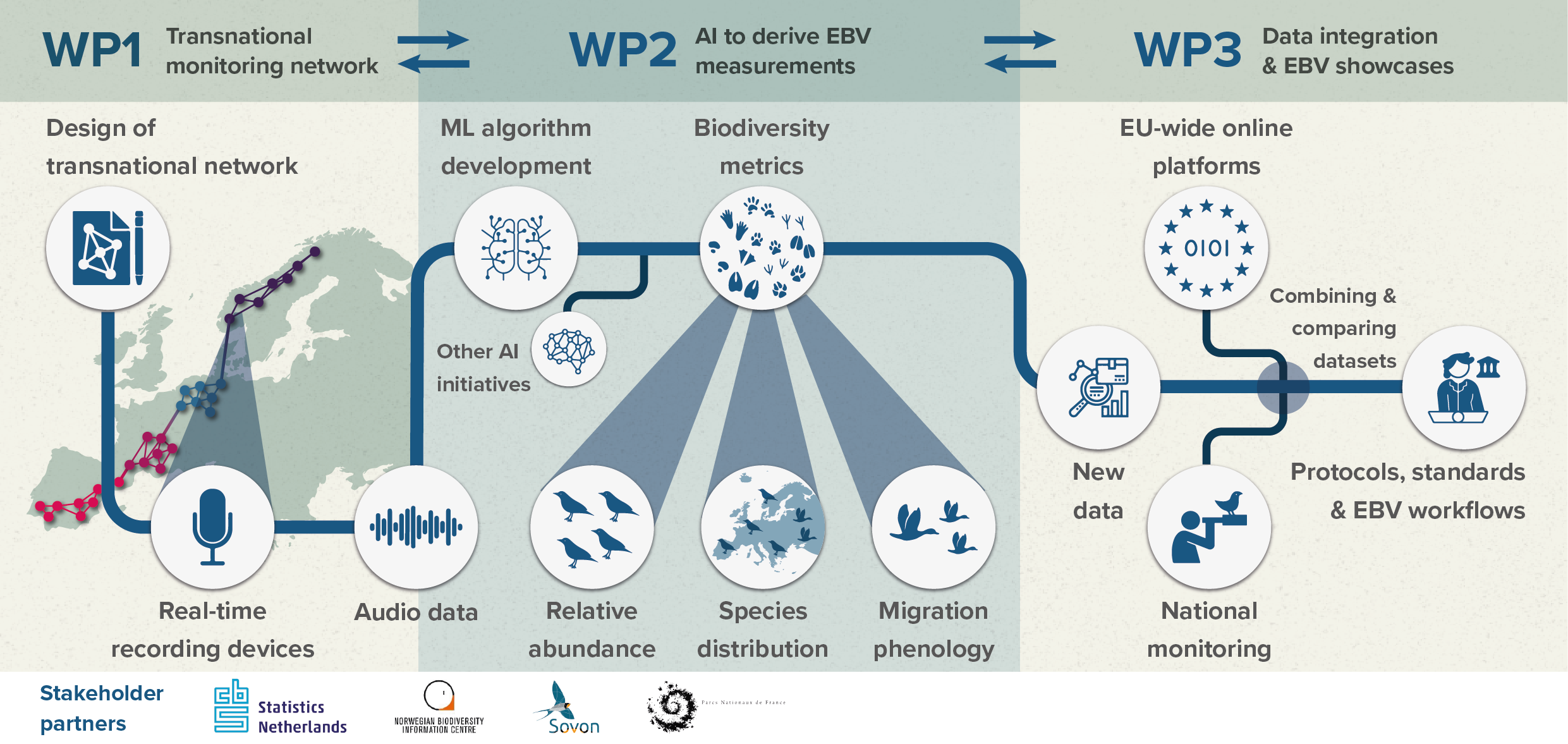
TABMON — Towards a Transnational Acoustic Biodiversity Monitoring Network — establishes a standardised, cross-country passive acoustic monitoring (PAM) network to transform large-scale soundscape recordings into policy-relevant biodiversity indicators. We harmonise collection, analysis, and integration of acoustic data across four biogeographic regions so results are directly comparable and actionable for conservation.
🎯 Our Vision
Operationalize a paneuropean network of autonomous acoustic sensors and deploy advanced AI pipelines to convert soundscapes into Essential Biodiversity Variables (EBVs) aligned with global biodiversity frameworks. This approach complements traditional surveys, fills critical gaps in reporting for EU directives and the EU Biodiversity Strategy 2030, and provides high-frequency temporal resolution for early-warning monitoring.
💡 Why Acoustic Monitoring Matters
Passive acoustic monitoring offers unique advantages:
- Non-invasive, 24/7 monitoring of nocturnal and cryptic taxa often missed by traditional surveys
- Cost-effective scaling across remote and inaccessible landscapes
- High-frequency time series suitable for phenological tracking and population trend detection
- Standardized, comparable data across multiple biogeographic regions and countries
🚀 Network at a Glance
Deployed across 4 countries from the Arctic to the Mediterranean
High-quality soundscape data with standardised metadata
Norway, Netherlands, France & Spain
Experts in AI, ecology, acoustics & field deployment
🏛️ Project Leadership
Coordinator: Norwegian Institute for Nature Research (NINA)
Project lead: Benjamin Cretois
Project administrator: Carolyn Rosten
Funding: Biodiversa+ (with national agencies)
Duration: 2024–2027
Countries (current focus): Norway, Netherlands, France, Spain
Selected partners: University of Amsterdam, Tilburg University, Naturalis, Statistics Netherlands (CBS), Sovon, CTFC, Université de Toulon/LIS
📋 Latest Updates
About TABMON
September 4, 2025
Learn about our mission to revolutionize biodiversity monitoring through acoustic sensing and AI across Europe
Latest News & Updates
September 4, 2025
Stay updated with TABMON project milestones, research findings, and upcoming events
Meet the TABMON Team
September 4, 2025
International consortium of researchers, institutions, and partners driving Europe's acoustic biodiversity monitoring revolution
Methods & Technical Approach
September 4, 2025
Detailed methodology, work packages, and technical workflows for TABMON's acoustic biodiversity monitoring network
Publications & Research Output
September 4, 2025
Peer-reviewed publications, conference presentations, and technical reports from the TABMON project
Resources & Tools
September 4, 2025
Access TABMON's dashboard, code repositories, technical documentation, and data resources for Europe's acoustic biodiversity monitoring network